- Workflow(固定工作流)vs Agent(自主智能体)的精准边界——什么时候该用 Agent,什么时候千万别用。
- Function Calling / Tool Use 的底层交互真相(大模型其实并不执行代码,它只输出结构化调用意图)。
- MCP(Model Context Protocol) 如何像 USB-C 一样终结
M × N工具集成噩梦。 - 生产级 Agent 必备的 5 条工程护栏(防死循环、防误删、防注入、上下文压缩、可观测追踪)。
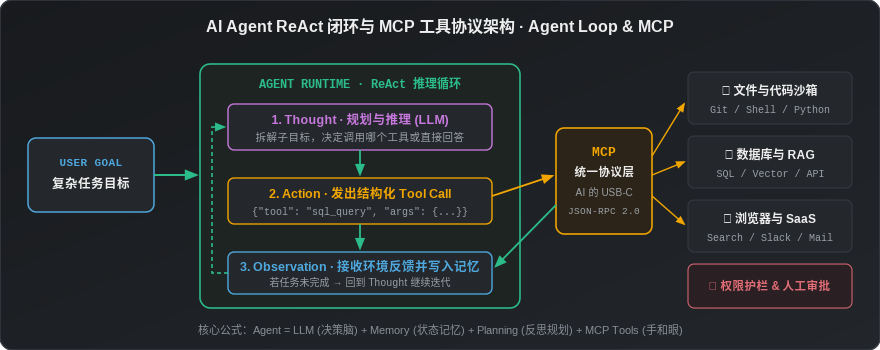
1. 到底什么是 AI Agent?一个公式看懂 / What Actually Is an AI Agent?
市面上到处都在喊“Agent”,但把它扒开外壳,核心公式其实极其朴素:
核心公式:
Agent = LLM(大脑) + Tools(手和眼) + Memory(状态记忆) + Loop(自主闭环)
- 普通 Chatbot:你说一句 → 它答一句 → 结束。它看不到实时报错,也不能自己去查数据库或改文件。
- Workflow(确定性工作流):开发者把步骤写死(A → B → C),LLM 只负责其中一个节点的文本加工。特点是成本可控、极其稳定。
- Agent(智能体):你只给一个目标(例如 “帮我排查今天线上订单接口 500 报错的原因并提一个修复 PR”),模型在循环中自主决定先查日志、再读代码、再跑单元测试,根据每一步的真实反馈(Observation)动态调整下一步行动,直到目标达成!
Strip away the hype, and every AI Agent reduces to one clean equation:
Core Formula:
Agent = LLM (Brain) + Tools (Hands & Eyes) + Memory (State) + Loop (Autonomy)
- Chatbot: Single turn in, single turn out. No interaction with the live world.
- Deterministic Workflow: The engineer hardcodes the control flow (
A → B → C), invoking an LLM inside specific nodes. Predictable and cheap. - Agent: You provide a goal (“Diagnose today’s 500 errors on
/checkout, fix the bug, and verify tests pass”), and the LLM dynamically chooses tools, reads real observations, adapts its plan, and loops until the task succeeds.
2. 拆解底层:Function Calling / Tool Use 究竟怎么工作? / Under the Hood of Tool Use
新手常误以为大模型内部能直接“上网”或“连数据库”。其实完全不是!模型依然只能接收文本、输出文本。整个 Tool Use 是一场模型与宿主程序(Runtime)之间的四步双簧:
- 声明工具清单:宿主程序把可用工具的名称、自然语言描述、参数 JSON Schema 放进请求发给 LLM。
- 模型输出调用请求:模型分析用户意图后,停止输出普通聊天文本,而是返回一个结构化指令:
{"name": "query_order_status", "arguments": {"order_id": "ORD-9527"} }。 - 宿主程序真正执行:你的后端代码收到这个指令后,在沙箱/服务端执行真正的 SQL 或 API 查询,拿到真实结果
{"status": "shipped", "eta": "2026-11-28"}。 - 回传结果继续推理:宿主程序把工具结果作为
role: "tool"消息追加进上下文,再次发给 LLM,由模型决定是继续调下一个工具,还是整理自然语言回答用户。
LLMs never execute code or call APIs directly—they still only read and emit tokens. Tool Use is a four-step handshake between the LLM and your Host Runtime:
- Tool Declaration: Your runtime sends tool names, descriptions, and JSON parameter schemas alongside the prompt.
- Structured Tool Call: Instead of replying to the user, the LLM emits a structured request like
{"name": "query_order_status", "arguments": {"order_id": "ORD-9527"} }. - Local / Sandbox Execution: Your host code validates arguments, executes the real function/API, and captures the return payload.
- Observation Feedback: Your host appends the result as a
toolmessage and invokes the LLM again to either call another tool or synthesize the final response.
35 行 Python 看透 ReAct Agent 核心循环 / Minimal 35-Line ReAct Loop
1 | import json |
3. MCP(Model Context Protocol):AI 世界的 USB-C 接口 / MCP: The USB-C Port for AI Tools
过去给 AI 接工具是一场 M × N 集成灾难:假设你有 M 个 AI 客户端(Claude Desktop、Cursor、自研 Web Agent)和 N 个外部系统(GitHub、Postgres、Slack、Notion),每对组合都要手写一遍专属胶水代码。
由 Anthropic 发起并迅速成为全行业事实标准的 MCP(Model Context Protocol),用一套基于 JSON-RPC 2.0 的开放协议把它简化成了 M + N:
- MCP Server(工具提供方):数据库、GitHub、文件系统只需按 MCP 标准暴露一次
Tools(可执行动作)、Resources(只读数据)和Prompts(复用模板)。 - MCP Client(AI 宿主应用):任何兼容 MCP 的 Agent 框架或 IDE,插上就能自动发现并调用所有工具,像 USB-C 插头即插即用!
Before MCP, connecting M AI apps (IDEs, chatbots, internal agents) to N data sources (GitHub, Postgres, Slack, Jira) meant writing M × N bespoke glue integrations.
MCP (Model Context Protocol)—an open standard built on JSON-RPC 2.0—collapses this into M + N:
- MCP Servers expose
Tools(actions),Resources(readable context), andPromptsonce through a uniform schema. - MCP Clients (any compliant IDE, CLI, or custom Agent runtime) automatically discover and invoke any server plug-and-play—just like USB-C for hardware.
4. 生产级 Agent 五大保命护栏 / Five Production Guardrails You Must Build
Demo 里的 Agent 看起来酷炫,真放到生产环境若少了这五道护栏,轻则烧光 API 账单,重则删库跑路:
Agent demos look magical, but deploying one to production without these five guardrails risks runaway bills or destructive side effects:
| 护栏 Guardrail | 防什么风险 Prevents What? | 落地做法 Concrete Implementation |
|---|---|---|
| 1. 最大步数与预算熔断 | 工具报错导致模型无限重试死循环 | 硬编码 max_steps(如 10~20 步)与单次任务 Token/费用上限 |
| 2. 读写权限分级与人工审批 (HITL) | 误删生产数据、误发群发邮件、误转账 | 只读工具自动放行;写操作/支付/删除必须弹窗暂停等待 Human-in-the-Loop 确认 |
| 3. 极简且清晰的工具文档 | 工具描述含糊导致模型频频传错参数 | 把工具描述当成写给初级工程师的 API 文档,给出明确参数例子与错误提示 |
| 4. 沙箱隔离执行 | Agent 生成的 Shell/Python 代码污染宿主机 | 代码执行一律放 Docker / MicroVM 隔离沙箱,严禁暴露生产私钥 |
| 5. 全链路 Trace 可观测 | 出错后完全不知道模型在哪一步想歪了 | 记录每一步的 Prompt、Tool Input/Output、耗时与 Token(如 Langfuse / OpenTelemetry) |
永远从最简单的方案开始:如果一条确定性的代码流水线(Workflow)就能稳定解决 95% 的需求,就不要硬上高自由度的自主 Agent。把自主权留给真正需要动态探索、步骤不可预知的复杂任务(如代码调试、跨源深度调研)。
5. 权威延伸阅读 / Further Reading
- 🏛️ Anthropic Engineering: Building Effective Agents — 史上最接地气的 Agent 架构必读长文,清晰区分 Workflow 与 Agent 模式。
- 🔌 Model Context Protocol: Official MCP Specification & Docs — 官方协议文档、SDK 与海量现成 MCP Server 清单。
- 📄 ReAct Paper: ReAct: Synergizing Reasoning and Acting in Language Models (Yao et al.) — ReAct 范式开山之作。
- 🧠 Lilian Weng (OpenAI): LLM Powered Autonomous Agents — 系统梳理 Planning、Memory 与 Tool Use 的经典综述。