🐍 PYTHON PY-03 ⏱ 9 min

Python 实战三板斧:FastAPI 写接口、Pydantic 数据校验与自动化脚本

Practical Python Triad: FastAPI Services, Pydantic v2 Contracts & Automation Scripts

🌐 阅读模式 / View Mode:
📑 目录 / Table of Contents
🔑为什么是这三板斧? / Why This Triad?

无论是开发 AI 后端服务、内部效率工具,还是写日常批处理脚本,Pydantic(数据边界)+ FastAPI(HTTP 服务)+ pathlib/httpx(文件与网络自动化) 可以覆盖 90% 的真实需求,代码量极少却稳如磐石。
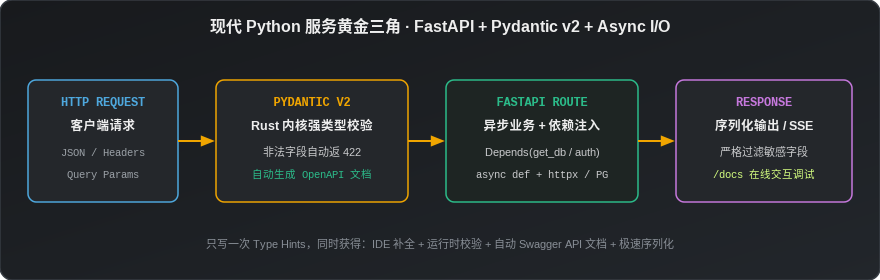
FastAPI and Pydantic v2 Service Architecture

1. Pydantic v2:把脏数据挡在系统门外 / Pydantic v2: Strict Data Boundaries

中文

Pydantic v2 底层用 Rust 重写,解析速度极快。它在边界处自动做类型校验、默认值填充、范围约束与 JSON 序列化——在 AI 开发中更是 Structured Outputs 的官方标配:

EN

Powered by a Rust core, Pydantic v2 validates untrusted JSON at system boundaries with clear errors and doubles as the standard schema layer for LLM Structured Outputs:

1
2
3
4
5
6
7
8
9
10
11
12
13
14
from pydantic import BaseModel, Field, field_validator

class ArticleInput(BaseModel):
title: str = Field(min_length=3, max_length=120)
tags: list[str] = Field(default_factory=list, max_length=5)
score: float = Field(ge=0.0, le=10.0)

@field_validator("title")
@classmethod
def strip_title(cls, v: str) -> str:
return v.strip()

item = ArticleInput.model_validate({"title": " FastAPI 实战 ", "score": 9.5})
print(item.model_dump_json())

2. 25 行 FastAPI:高性能异步接口 + 自动 Swagger 文档 / 25-Line Production FastAPI

中文

启动后访问 http://127.0.0.1:8000/docs 直接送你一套交互式 API 文档,输入格式不对自动返回清晰 422 错误详情,彻底告别手写参数校验 if/else:

EN

Run uv run uvicorn app:app --reload and open /docs for instant interactive Swagger UI plus automatic 422 validation errors:

1
2
3
4
5
6
7
8
9
10
11
12
13
14
15
16
17
18
19
20
21
22
23
24
25
26
# app.py -> 启动命令: uv run uvicorn app:app --reload
from fastapi import FastAPI, HTTPException
from pydantic import BaseModel, Field

app = FastAPI(title="Mini Note API")
DB: dict[int, dict] = {}

class NoteCreate(BaseModel):
title: str = Field(min_length=1, max_length=100)
content: str

class NoteOut(NoteCreate):
id: int

@app.post("/notes", response_model=NoteOut, status_code=201)
async def create_note(payload: NoteCreate) -> NoteOut:
note_id = len(DB) + 1
record = {"id": note_id, **payload.model_dump()}
DB[note_id] = record
return NoteOut(**record)

@app.get("/notes/{note_id}", response_model=NoteOut)
async def get_note(note_id: int) -> NoteOut:
if note_id not in DB:
raise HTTPException(status_code=404, detail="Note not found")
return NoteOut(**DB[note_id])

3. 跨平台自动化脚本铁律:pathlib 替代 os.path / Cross-Platform Automation with pathlib

中文

写批量整理文件、处理 Markdown/CSV 的脚本时,彻底忘记 os.path.join 字符串拼接!用内置的 pathlib.Path,用 / 运算符拼路径,macOS、Linux、Windows 全部原生兼容:

EN

Always prefer pathlib.Path over legacy os.path string manipulation—the / operator works identically on macOS, Linux, and Windows:

1
2
3
4
5
6
7
8
9
from pathlib import Path

def count_markdown_words(root_dir: str) -> dict[str, int]:
root = Path(root_dir)
stats: dict[str, int] = {}
for md_file in sorted(root.rglob("*.md")):
text = md_file.read_text(encoding="utf-8")
stats[str(md_file.relative_to(root))] = len(text)
return stats
💡下一步实战衔接 / Next Step

掌握这三篇现代 Python 核心后,立刻前往 Python AI 实践专栏,用你刚学会的 Pydantic、asyncio、httpx 和 pytest 亲手写出可落地的 LLM 客户端、混合检索 RAG 与可控 AI Agent!

4. 权威链接 / Official Docs